Showing posts with label PBCS. Show all posts

Saturday, September 26, 2020

Dashboards 2.0 - Geomaps


This is my first blog post in a while and it’s mainly due to 2020 being one challenging year on a personal level! Apart from the COVID-19 situation the world is facing, I broke my right foot back in February and I had to go under the knife in March, and consequently, I was sidelined for three months and forced to use crutches and wear a boot. So, you can imagine blogging was not on top of my list of priorities.

This post is about the Geomaps that was newly introduced in Dashboard 2.0, I was interested to see how the metadata/location tagging side of things would work in a Planning application and thanks to Oracle, the new feature did not disappoint.

I will be using the Vision application for my demo and I will start with the hierarchy, I used Entity dimension (you can use any dimension which I’m going to show at the end) to create a countries rollup so I can simply enter some data and see if the dashboard would work.

To understand how do you need to build the metadata for Geomaps to work, there is a file to download which Oracle has provided with the full list of countries. You need to use the names exactly as they are shown in the file for Geomaps to work. You don’t need to create the full list or follow the hierarchy provided in the file, you just need to make sure you have a member name or an alias that matches the country name in the file.

To download the file, create a new dashboard 2.0:


Select any data form and drag it to the canvas, change the view to Geomap and go to chart type properties to download the file.


So, based on the file I’m going to create a new rollup in the Entity dimension (you can use any dimension and I’m going to show that at the end) and notice that I’m creating a mix of cities and countries as members and assigning the country name to the city members to see if this would work! Here is the rollup:
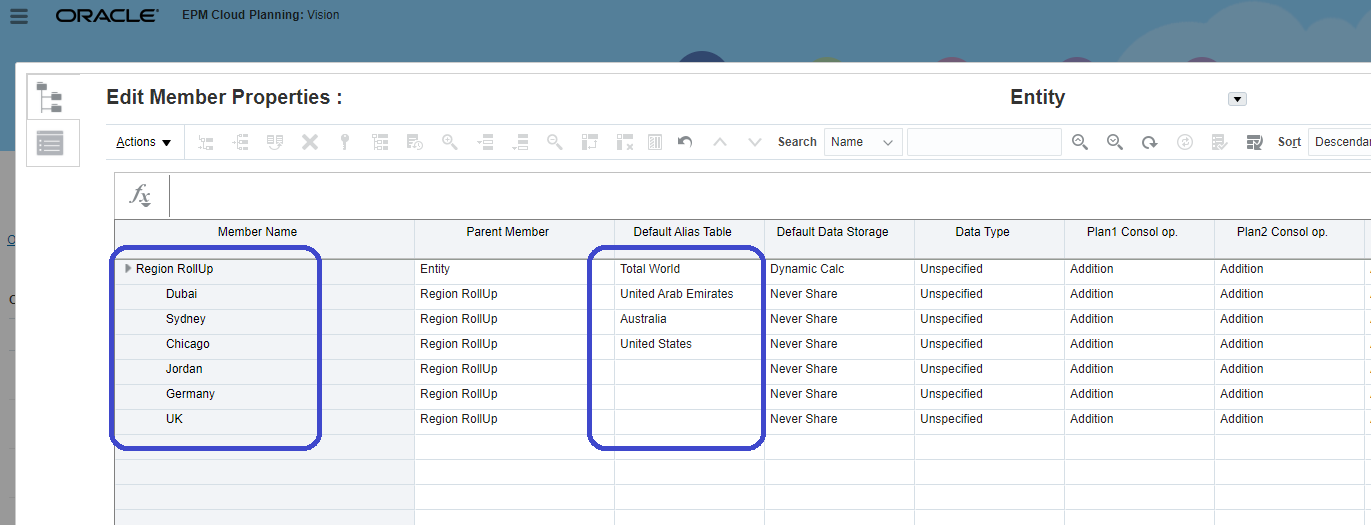


Next thing, I will enter some dummy data so I can use the form in the dashboard.


The last step is to create a dashboard 2.0, select the data form, and change the chart type to Geomaps.

Here is the dashboard in tabular format and you can see the data is showing for all countries.
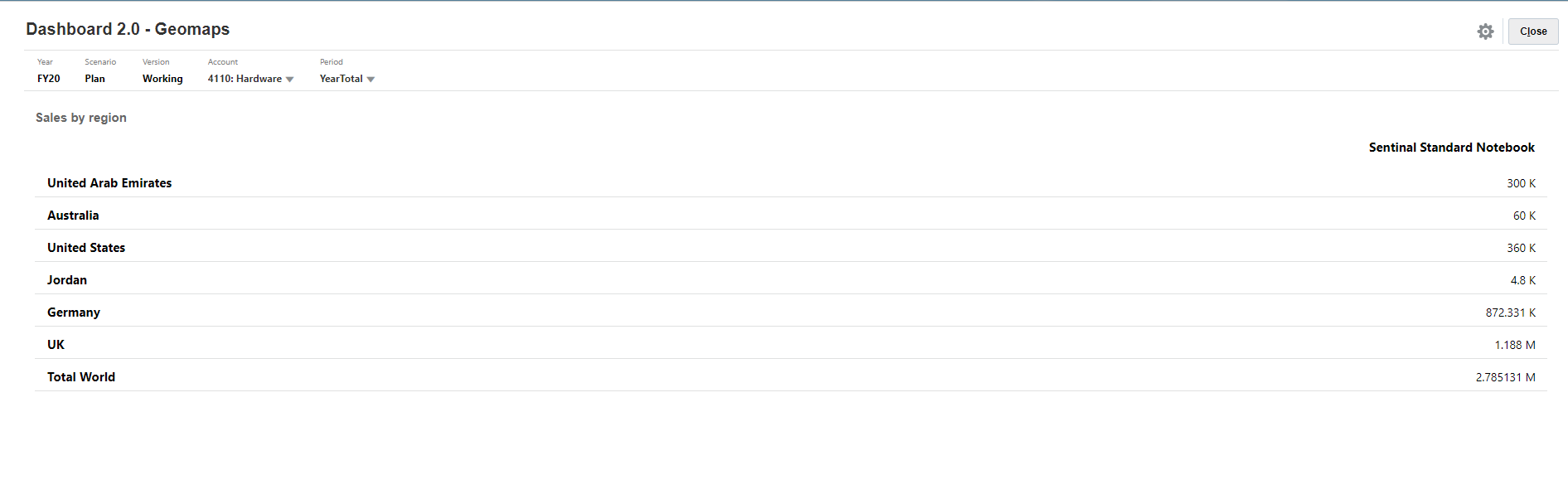

I will change the chart type to Geomaps and see the result

And yes, it is working except for the UK numbers and that is because the member name is “UK”, not “United Kingdom” as specified in the original file. 


So, to fix this I will simply add an alias to the member.


I will refresh the dashboard and now I can see the UK numbers.


That is it, it is straight forward and very simple to set up. Thanks, Oracle!

Before I wrap it up, I want to show that you can use any dimension, and not just Entity, to store your countries metadata. So, I created another rollup in the Channel dimension as follows:


And a simple data form to store the data (notice the No Entity member selection).


Finally, here is the dashboard based on the Channel rollup.


As demonstrated, the new geomaps chart type is pretty powerful and relatively simple to set up, and most importantly, we don’t need to have any major changes in the application to get it to work.


Thursday, February 7, 2019

EDMCS - Node Qualifiers and Subscriptions


It's been a while since I last wrote an article, hopefully this will change in the coming months. This is going to be a quick one about a cool (must have) functionality in Enterprise Data Management Cloud Service (EDMCS) and that is Node Type Qualifiers and Subscriptions. I'm not going to deep dive into the product and I'm assuming you have some functional knowledge already.
According to Oracle documentation:


Quote
A node type qualifier is a prefix that you define for a node type which allows for unique node type naming. You define node type qualifiers for external applications that use unique naming for node types or dimensions. For example, an application may use these prefixes for entities, accounts, and cost centers: ENT_, ACCT_, and CC_.
Qualifiers are used by Oracle Enterprise Data Management Cloud when you compare nodes, display viewpoints side by side, and drag and drop from one viewpoint to another.
For example, if you have a cost center named 750 in your general ledger application and you want to add it to your Oracle Planning and Budgeting Cloud application, you can drag and drop the cost center from the general ledger viewpoint to the Oracle Planning and Budgeting Cloud viewpoint. With the node type qualifier defined and a node type converter set up, the cost center in Oracle Planning and Budgeting Cloud will be added as CC_750.
End Quote


In this post I will show to implement the following scenario:
1.    Manage Account segment metadata in General Ledger viewpoint
2.    Use subscriptions to link automatically update PBCS Account viewpoint based on changes in General Ledger's Account viewpoint

Let's get on with it, I have two applications setup for this.

1.    General Legder (my source application)
2.    PBCS (my target application)


I also have a Node Type Qualifier for my PBCS Account dimension (Good old Essbase won't let you have duplicate member names). As you can see in the screenshot below, I have specified A as my Account member prefix qualifier. This means if I add an account value 10000 in ERP it would be automatically created as A10000 in PBCS.


Next step is to create a Node Type Converter to convert the General Ledger Account properties in PBCS viewpoint. This is needed to capture the Alias of the member based on the description property in General Ledger Account segment.


Next step is create a subscription to link PBCS Account viewpoint to General Ledger's Account viewpoint and this will ensure whatever changed you're doing in GL is captured in PBCS. I opted for Auto-Submit subscription type which means the changes in the source viewpoint (General Ledger) will be applied without manual/user intervention in the target viewpoint (PBCS in this example).


Now I will show the current Account viewpoint in both General Ledger and PBCS applications. I have created a simple Account hierarchy and as you can see I have two child accounts under the Account parent 10000 (A10000 in PBCS)


GL


PBCS


I'll go and create a new request to add a new Account member in GL view and see how it gets captured in PBCS. As shown in the screenshot below, I created an Account 10003 with description Mobile Allowance and will go ahead and submit the request.


After successfully submitting the request, EDMCS will create a subscription request to update the change in PBCS. As shown below, there is one Interactive request in General Ledger and another Subscription request in PBCS. Both requests had 1 item and reported no issues. So far so good.


Here is the request details showing one Account node was created and prefixed with "A" in PBCS, and the Alias was captured using the Node Type Converter. The cool thing worth mentioning is how EDMCS managed to insert the member in the correct position even though the parent acocunts in GL and PBCS have different names (10000 and A10000). That's pretty awesome if you ask me!

Finally, I will check my PBCS Account viewpoint and confirm the member node has been created an placed under the correct parent.


And that is it for today, hope you find this useful. EDMCS is pretty awesome and I think what is coming in the future will make this one of the best enterprise data management tools in the market.


Well done Oracle!


Friday, July 27, 2018

E-PBCS Tricks - Navigation Flows

We all love Navigation Flows,,don't we? Sometimes we have to deal with a number of Navigation Flows per user role (Planners,,,Super Users,,etc) and if you don't take a sound design approach you may end up with a lot of repetitive and manual work to maintain them.

In this post I'll show a simple and efficient way to handle multiple Navigation Flows and Data Forms. I'll start with my data forms. I have three data forms I want to group in a Card for ease of access.


This Card is going to be visible to both Planners and Super users. It's a simple Card as shown here.


I'm going to create a Global Navigation Flow which will act as my source Navigation Flow. I've created the card "Actual vs Plan" in Global, as you can see it's "Inactive" but that is not going to be a problem.


I also have the two main Navigation Flows (Planners and Super Users) and both are having the card "Actual vs Plan" Card as a local Existing object referencing Global Navigation Flow.


So, If I switch to a "Super User" Navigation Flow I'll get to see the card.


Same applies to "Planners" Navigation Flow.


So far so good,, it's straight forward and simple. Here comes the beautiful part, what if you have a lot of changes to the Card (re-ordering forms, adding new forms  etc)... good thing is that you don't need to go to every Navigation Flow and update the Card, you just update the master Card in "Global" and updates will be rolled-out to the flows.

So if we want to add a new tab/form "IT", simply go to "Global" Navigation Flow and update the Card.


We just need to "Reload Navigation Flow" and that's it.


Users can see the new tab.


Voila, that's it!

In this example I just showed a Card with three forms and two Navigation Flows, in reality you might have a lot more than that, so this is certainty a great way to manage your Navigation Flows.


Thursday, January 18, 2018

PBCS December 2017 Update

This is a quick post about a recent update in PBCS I noticed by accident 😅,,,

The update as specified by Oracle December 2017 Planning and Budgeting Update

TREE VIEW SET AS THE DEFAULT FOR REPORTS AND TASK LISTS

I know its not a big deal, but I find it efficient and way easier than the old way of navigating reports and task lists which I found time-consuming and nerve-racking. Coming from On-Premise days and old standard interface where we had the relatively easy to navigate task lists and folders, I'm quite happy with this update.

So now when you go to Reports or Tasks the tree view is the default option.

Here is my Tasks card, and by default it's shown as tree (yeah finally!)


And from there you simply expand the task you want rather than select the task from a menu.


And similarly for Reports card


Another update was the new dates custom defined functions which can be handy.

The update as specified by Oracle December 2017 Planning and Budgeting Update
NEW CUSTOM FUNCTIONS IN CALCULATION MANAGER
Five new custom functions have been added to Calculation Manager. Each of these functions correspond to an existing function in that the existing functions return only positive numbers, and the new functions can return either a positive number or a negative number, depending on the calculated result. The new functions (and the existing function to which they correspond) are:
Existing Function
New Function
@CalcMgrDateDiff
@CalcMgrDiffDate
@CalcMgrYearsBetween
@CalcMgrYearsDiff
@CalcMgrMonthsBetween
@CalcMgrMonthsDiff
@CalcMgrDaysBetween
@CalcMgrDaysDiff
@CalcMgrWeeksBetween
@CalcMgrWeeksDiff

It's pretty self explanatory, prior to the new functions you had to make sure your To_Date is after From_Date otherwise you could run into trouble, so we used to workaround this by using validations rules in the form etc, now thanks to the new functions we can build the validation logic in the rule itself if required.

So here is a form with dates and I wrote a simple business rule using the old and new functions to highlight the difference. As you can see the new functions can return negative values unlike the old/existing functions which returns positive values and that could be misleading.


That's it for today.


Thursday, July 13, 2017

Quick July-2017 PBCS Update - Audit & Groovy Java API URL

PBCS Audit Feature

Did you notice in your Test POD the newest card "Audit" in "Application" cluster?


I did not read about it in July's Planning and Budgeting update maybe because it's already in the previous releases but maybe in a different place (Activity Reports.)....


The different is in Activity Reports you download or view the whole lot (data, metadata changes etc) unlike the new Audit feature, if you click on configure you get to selected the type of data you want to track for auditing.


Now if you change some data


You can see the records in Audit, you can filter for the audit transaction type (Data, metadata, rule...) for a specific date range, and you can export and delete the records.


If you click "Actions"


You can export the same in Excel csv (you'll get a similar file format to Activity Report's downloadable reports), and you can delete all records or a specific type only.


Groovy Java API reference link

The Groovy Java API reference library can now be accessed from:

http://docs.oracle.com/cloud/latest/epm-common/GROOV/


After 8th of August the Groovy Javadocs Academy link in your POD will be re-directed to that link.

This means, it's even easier to access the library without having to login to your service to access the documentation.


Friday, June 30, 2017

Groovy, E/PBCS, and Random() stuff....

My last few posts were talking about EPBCS and the newest (most powerful and exciting) feature added recently to the cloud which is Groovy scripting! My background is computer science and naturally, I was super excited about the latest addition and started instantly writing scripts and playing around with it.

Thanks to Celvin Kattookaran who read the Groovy posts and his valuable feedback, he suggested a simpler way of writing the code, and after we exchanged some comments it turned out I was using an old version of the API and he got me in touch with the Oracle Calculation Manager development team, who were kind enough (Thank you Ujwala Maheshwari!) to call me and give me some updates and insights on the latest Groovy scripting feature, as well as the current API library and some of the examples provided. So I thought I should share some of the points/findings:


Some of the pre-built EPBCS Groovy rules are written using the old API version

This is going to be updated soon (maybe as early as August 2017), Good thing that the API library has a lot of useful examples, to access this library go to Academy Groovy Javadocs and simply enjoy! The documentation provided by Oracle here is superb, very clear, powerful and well-written examples, this must be in your browser's favorites


Groovy is simpler than Java

I come from computer science background, I learned to program first using low-level languages (Assembly) and then moved to high-level languages (Pascal, C, VB and Java), why am I mentioning this? because you're very likely to start scripting in Java and totally forget how awesome and groovy Groovy the language is! So what is wrong with writing code in Java? Nothing, but if you can achieve the same result with fewer lines that look more aesthetic then why not?

I will give a very simple example to highlight the above, consider a script that prints Hello World and the current day, this is the first thing you'll learn how to write in any programming language, I'll write the same in Java and Groovy and see where they are different.

Java


1
2
3
4
5
6
7
8
9
import java.util.Date;
import java.text.*;
public class Main{
    public static void main(String[] args) {
       DateFormat dateFormat = new SimpleDateFormat("EEE, MMM d, yyyyy"); 
       Date date = new Date(); 
       System.out.println("Hello, World! Today is: " + dateFormat.format(date));
    }
}

Output


Groovy


1
2
3
4
import java.text.*
DateFormat dateFormat = new SimpleDateFormat("EEE, MMM d, yyyyy")
Date date = new Date()
println("Hello, World! Today is: " + dateFormat.format(date))

Output


So, what do you think? Groovy certainly looks nicer and more concise, I wanted to add the date bit because I wanted to highlight some differences between Java and Groovy in the given example:

1. In Groovy, java.util package is imported by default, hence the import line is missing from my Groovy script unlike Java where you need to import every package/class you intend to use.

2. In my Groovy script I don't have a class and method declaration like Java, so if you just want to print Hello World you just need


println("Hello World!")

3. To get formatted dates, you need DateFormat and SimpleDateFormat classes, in both Groovy and Java you need to import the classes

4. Another difference is the semi-colons, in Groovy I don't need to end my lines with ";"

For a more detailed list of differences click here


You can write a perfectly functioning Groovy script and then realize it's really a Java script

One of the first scripts I wrote when I was testing Groovy in EPBCS was a data validation script to prevent users from entering negative values, so the first time I wrote the code it was exactly like this:


 1
 2
 3
 4
 5
 6
 7
 8
 9
10
11
12
13
14
15
16
17
18
EPMApplicationShell appshell = new EPMApplicationShell()
DataGrid grid = null;
// exit if rule is executed from Rules launcher
try {
grid = appshell.getCurrentGrid()
} catch(BindingsMissingException) {
return  '''BegBalance (
          @Return("Please run the rule from the dataform"),Error);
       )'''
}
//validate negative value
GridIterator itr = grid.dataCellIterator()
itr.each{ 
DataCell dc = it
if ((dc.isEdited()) && (dc.data <0)) {
dc.addValidationError(0xFF6347,"Cannot enter negative numbers")
}
} 


Lines 1 to 10 are there to make sure the script is launched in a form/grid and not Rules launcher, I borrowed this code from Trend Calculation Groovy rule in PBCS, and apparently this is the alpha version and we no longer need to define appshell variable or write the try catch statement. (leave it for now, I'll come back for it).

Lines 11 to 18 Invokes a Grid Iterator and checks edited data cells, and if negative values are found then throw an error.

Now, the following is the refined code:


1
2
3
4
// Validate negative value 
operation.grid.dataCellIterator{DataCell cell -> cell.edited}.each { DataCell cell -> 
if ((cell.data < 0)) 
cell.addValidationError(0xFF6347, "Cannot enter negative numbers") }

Oracle Calc Manager were kind enough to re-write my code and they explained the redundant bits.

Lines 1 to 10 are no longer needed and is simply replaced with "operation.grid", so when you try to run the rule above from Rules Launcher it will throw an error "grid not found" because of operation.grid.* which assumes there is an active grid, otherwise throw error and break.

Lines 12 to 18 can be replaced by a simple Closure block, coming from Java background the concept is still new to me, but that is what makes Groovy beautiful and easy to use!


Groovy in Action

Want to learn more about Groovy? Check this out, I'm enjoying this book and most importantly it is really fun to read! It is not written in a typical academic computer science text book style, which means it is fun to read, I don't remember ever enjoying reading my text books back at university. (You can get a combo deal at manning publications which includes a pdf, epub, and soft cover paper version)


What kind of subscription you need to have Groovy your POD? PBCS? PBCS + 1 module? or EPBCS?

Thanks to Shankar Viswanathan  Oracle Planning Product Management, I got this point clarified:

Groovy is technically made available for EPBCS App type which is different from saying it is only for EPBCS. There are three SKUs that customers can buy: PBCS; PBCS + 1 module option; EPBCS. If you buy the PBCS +1 module option you can still deploy the application as EPBCS App Type or convert from PBCS App Type to EPBCS App Type. It is just that contractually you can't deploy more than 1 module when you buy PBCS + 1 module. To get Groovy all you need is to have EPBCS App Type. To use groovy you don't even have to deploy any modules once you are in this EPBCS App Type. So technically it is available for PBCS as long as at least the PBCS + 1 module option is bought by the customer. You could be using just the custom cubes in EPBCS App Type and still use Groovy. There is no current plans to make it available for standalone PBCS. Hope this can be clarified in your future posts.


Yes, that is right you can have Groovy with PBCS as long as you go for the plus module option, if you ask me is it worth it? my answer is...


YES         YES       YES      YES